Prompts for Gemini AI Halloween photos, ready to copy
These prompts for Gemini AI Halloween edits are written for Nano Banana, the image model inside Google Gemini, so they work whether you paste them into the Gemini app or run them in this independent workbench. There are six: two selfie looks, two costume portraits, one for your pet and one for a couple. Each has an example image and spells out what to keep, what to change and what to avoid.
Selfie: the first two cards. Costume: the next two. Pet and Couple: the last two. Open the prompt under each example to read the full text, copy it for the Gemini app, or press "Use this look" to run it here with Nano Banana 2.
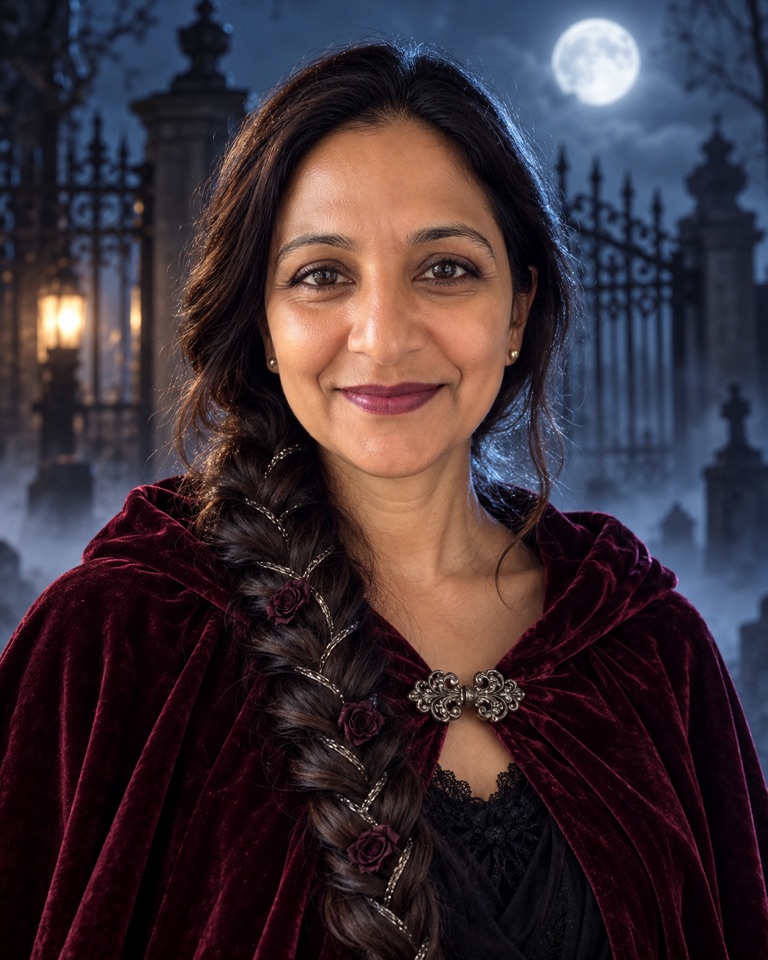
Moonlit Gothic Braids
Selfie prompt. One long fishtail braid woven with silver thread and tiny black roses, a burgundy velvet cloak and plum lips at a cemetery gate under a full moon. Changes hair and wardrobe, keeps your face.
Selfie prompt · Gemini / Nano Banana
Edit the uploaded selfie. Keep the person's face, identity, own skin tone exactly as in the photo, age, eye colour and expression unchanged. Change their hair into one long, glossy fishtail braid draped over the left shoulder, woven with fine silver thread and three tiny dried black roses, and dress them in a hooded deep-burgundy velvet cloak with the hood resting down on the shoulders, fastened with an antique silver clasp. Add dark plum lipstick and soft smoky eyes. Setting: a wrought-iron cemetery gate at night under a full moon, low blue fog, a faint cold rim light along the braid. Chest-up portrait, moody gothic editorial photography, 85mm lens, shallow depth of field. Do not change the face shape or skin tone, no fangs, no blood, no extra people, no text or watermarks.
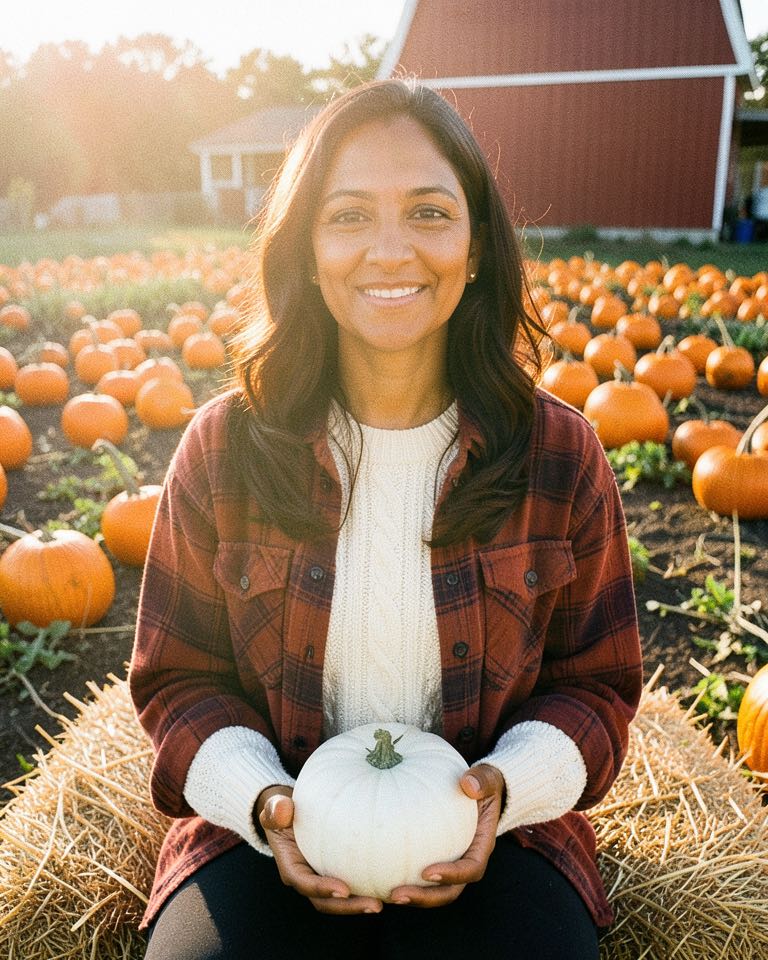
Pumpkin Patch Film Photo
Selfie prompt. A plaid flannel, a hay bale and a white pumpkin in golden light, finished like a 35mm film print. The not-scary option for a profile picture.
Selfie prompt · Gemini / Nano Banana
Edit the uploaded selfie. Keep the person's face, identity, own skin tone exactly as in the photo, age, hair length and smile unchanged. Change their outfit to a cream cable-knit sweater under a rust-red plaid flannel shirt, and place them sitting on a hay bale in a pumpkin patch, holding a small white pumpkin in their lap, rows of orange pumpkins and a red barn behind them. Golden late-afternoon sun, soft haze. Make it look like a 35mm film photograph: warm Kodak-style colours, gentle grain, slight light leak on one edge. Half-body framing. Do not alter the face or skin tone, no extra hands, no text, no date stamp, no watermarks.
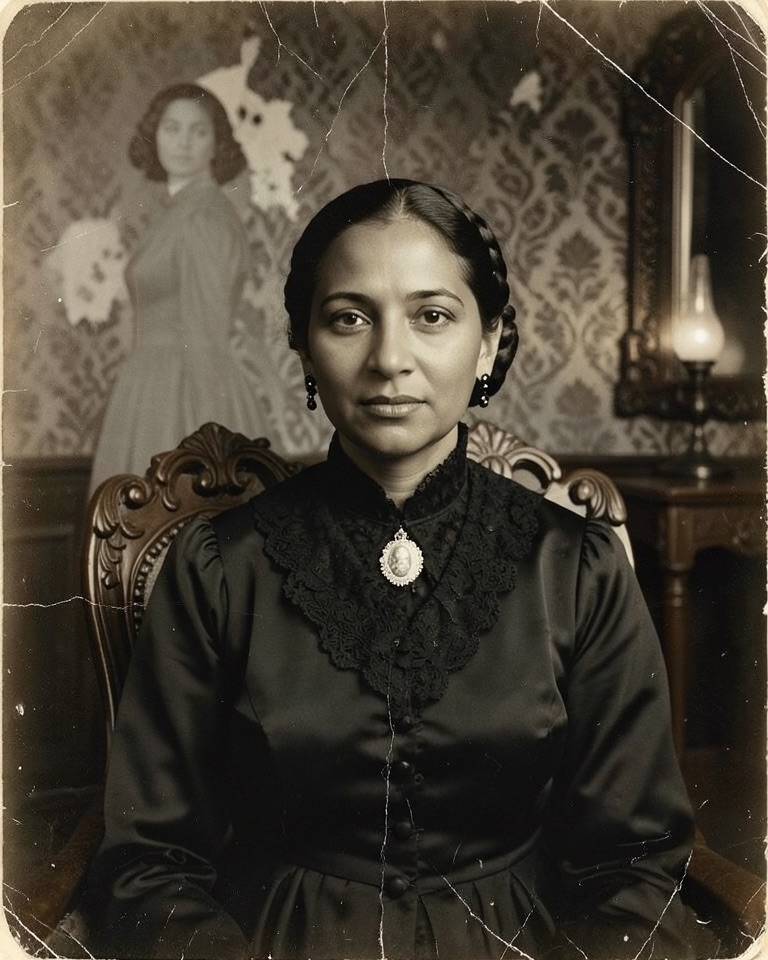
Haunted Victorian Parlour Portrait
Costume prompt. An 1880s mourning gown, lace collar and cameo in a lamp-lit parlour, aged like an albumen print, with a faint figure standing behind you.
Costume prompt · Gemini / Nano Banana
Edit the uploaded selfie into a haunted Victorian portrait. Keep the person's face, identity, own skin tone exactly as in the photo, age and features unchanged. Change their clothing to 1880s black silk mourning attire with a high lace collar, jet-bead details and a cameo at the throat, and style their hair in a neat period fashion. Seat them in a carved wooden chair in a dim parlour with peeling damask wallpaper and a single oil lamp; a faint translucent figure stands blurred in the background. Style: an aged albumen photograph with sepia tones, soft vignetting and fine cracks. Do not change the face or skin tone, no gore, no text, no frame caption, no watermarks.
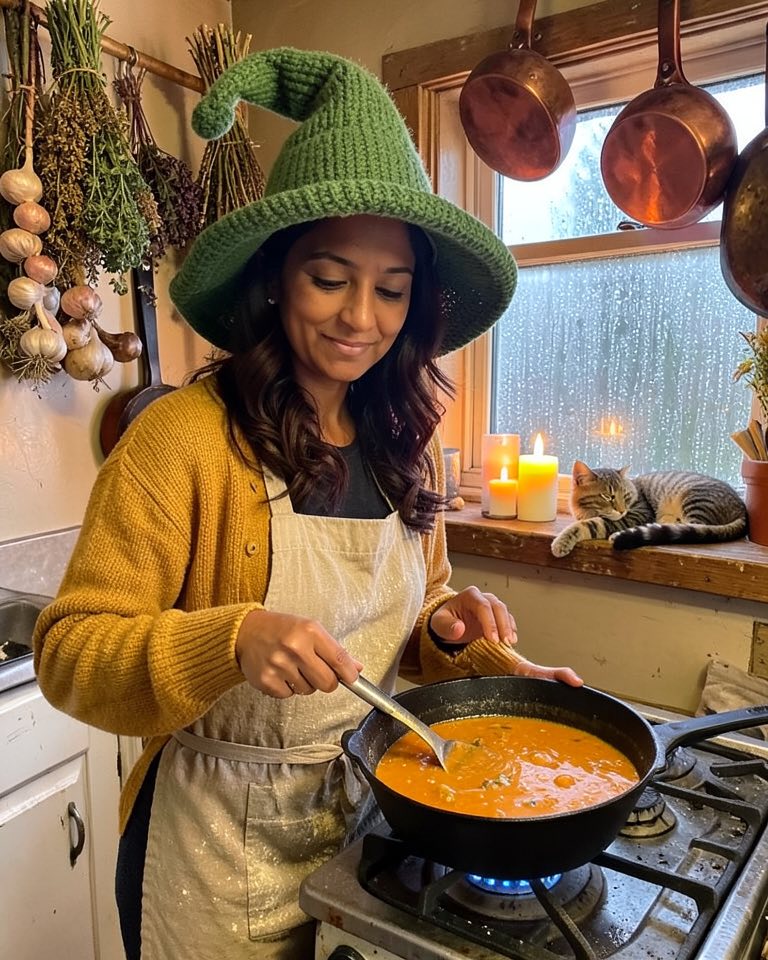
Cozy Cauldron Witch Kitchen
Costume prompt. A slouchy knitted witch hat, a flour-dusted apron and a cauldron of pumpkin soup in a candlelit cottage kitchen. Witchy without a single green-skin cliché.
Costume prompt · Gemini / Nano Banana
Edit the uploaded selfie. Keep the person's face, identity, own skin tone exactly as in the photo, age and hair unchanged. Give them a slouchy hand-knitted moss-green witch hat with a crooked tip, a mustard cardigan and a linen apron dusted with flour. Place them in a cozy cottage kitchen stirring a black cast-iron cauldron of orange pumpkin soup on an old stove; bundles of dried herbs, garlic braids and copper pans hang above, a tabby cat sleeps on the windowsill, candles and rain on the window. Warm amber light, storybook-cozy rather than scary. Half-body photo, realistic. Do not change the face or skin tone, no green skin, no text, no watermarks.
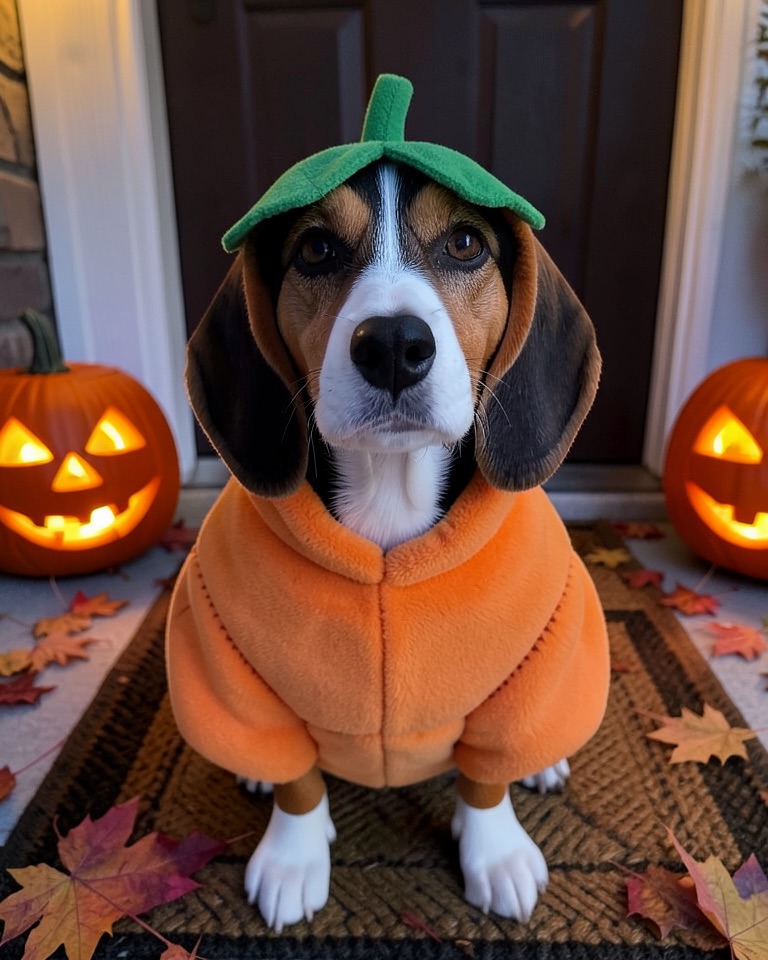
Plush Pumpkin Porch Pup
Pet prompt. Your dog in a padded pumpkin suit with a little stem hat, sitting among jack-o'-lanterns on the porch. Keeps breed, markings and eyes; nothing covers the face.
Pet prompt · Gemini / Nano Banana
Edit the uploaded pet photo. Keep the dog's breed, face, fur colour, markings, eye colour, ear shape and body size exactly as in the photo, and keep it a dog. Dress it in a soft plush pumpkin costume: a round orange padded body with stitched ridges around its torso and a little green stem-and-leaf hat between the ears, leaving the face, eyes and paws uncovered. Setting: a front porch at dusk with carved jack-o'-lanterns, a woven doormat and fallen maple leaves, warm porch light. Low camera height at the dog's eye level, sharp focus on its face, realistic pet photography. Do not change the species or markings, no human hands, no extra legs, no text, no watermarks.
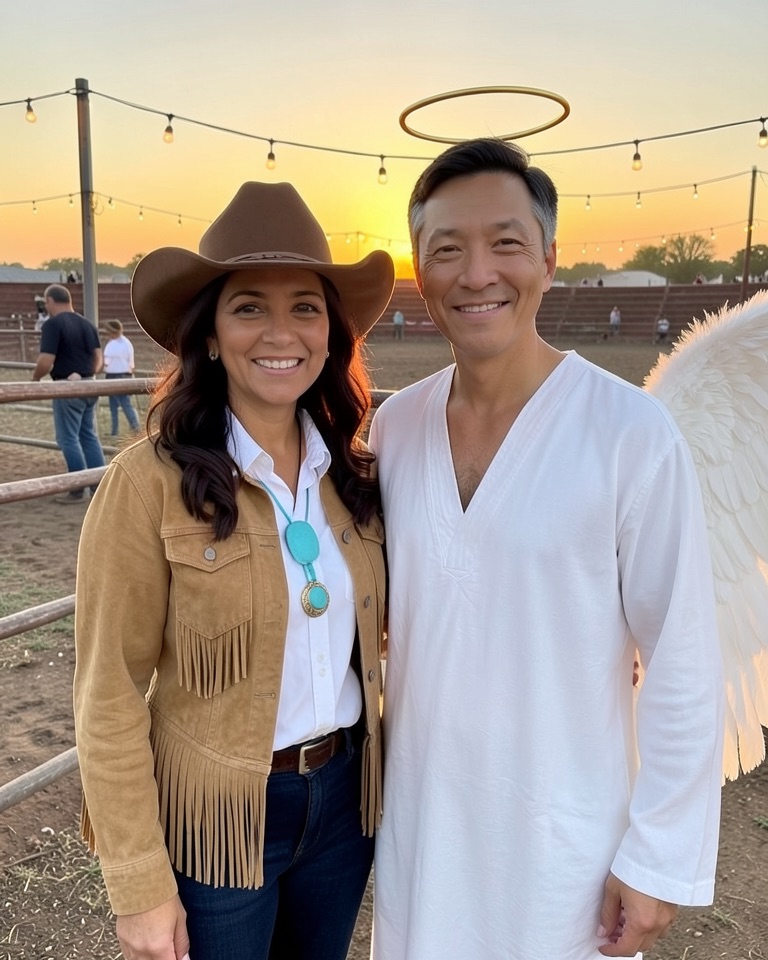
Rodeo Cowboy and Angel Pair
Couple prompt. One of you in fringe suede and a cowboy hat, the other in white wings and a halo, at a rodeo fence at sunset. Needs two photos, one per person.
Couple prompt · two photos · Gemini / Nano Banana
Use the two uploaded photos, one person per photo. Keep both people's faces, identities, own skin tones exactly as in their photos, ages and hair unchanged, and do not swap or blend their faces. Dress the person from the first photo as a cowboy: a tan suede fringe jacket, a white Western shirt, a brown felt cowboy hat and a turquoise bolo tie. Dress the person from the second photo as an angel: an all-white flowing robe, large soft white feathered wings and a thin gold halo floating above their head. They stand side by side, shoulders touching, at a small-town rodeo fence at sunset with string lights and a dusty arena behind them. Waist-up photo, warm golden light, playful smiles. Exactly two people, no third person, no text, no watermarks.
The examples were made during testing from fictional AI-generated people and a fictional dog, using these prompts: the gothic braid look with ChatGPT image generation, the other five with a small open image model (FLUX.2 klein). None is a Gemini or Nano Banana output; your results in Gemini or here will differ.
Run a Gemini Halloween prompt here
Pick a prompt above or paste your own. Upload your photo (two photos for the couple prompt), keep the Nano Banana 2 edit route selected and review the credit quote before you generate.
Add inputsAttach images, videos, or audio that are part of what you want to create.
0/4
JPG, PNG, WebP · 20 MB max
Just add the material you need. The generator will use it automatically.
0 / 5000
Nano Banana 2 is ready to select. Nano Banana 2.5 is coming soon. Choose any available image model and review the cost before generating.
Grouped by what you upload: Selfie (moonlit gothic braids, pumpkin-patch film photo), Costume (haunted Victorian portrait, cozy witch kitchen), Pet (plush pumpkin costume) and Couple (cowboy and angel).
Every prompt follows the same order: keep, change, setting and light, photo style, avoid. Edit one part at a time if a result misses.
In the Gemini app, attach your photo and paste the prompt. Here, "Use this look" loads it into the Nano Banana 2 edit route with a 3:4 canvas.
This site is independent and not a Google service; Gemini app limits and versions are set by Google.
Why one prompt works in Gemini and here
Nano Banana is the name Google gave the image generation and editing model in Gemini. When you attach a photo in the Gemini app and ask for a costume, that model does the edit. This workbench runs Nano Banana 2 and Nano Banana Pro through an independent provider account, so the same prompt text reaches the same model family. Nano Banana 2.5 is listed as coming soon and cannot be selected yet.
The prompts are long on purpose. Short requests like "make me a witch" leave the model to guess, and the first thing it guesses wrong is usually your face. Each prompt names what to keep before it names what to change.
Keep: face, identity, skin tone, age and the one feature you care about (hair length, smile).
Change: hair, outfit, accessories.
Setting and light: one place, one light source, one mood.
Style: film photo, albumen print, editorial portrait.
Avoid: changed skin tone, extra hands or people, text and watermarks.
Pasting a prompt into the Gemini app
Google decides which model version, daily limit and image size you get in the Gemini app, and those change with your plan and region, so check Google's own help pages for the current limits.
Open a new chat Start fresh so earlier messages do not steer the edit.
Attach your photo first Use the upload button and add one photo, or two for the couple prompt, in the order the prompt names them.
Paste the whole prompt Copy it with the "Copy prompt" button. Do not shorten the keep and avoid lines; they protect your face.
Fix one thing per follow-up If the hat is wrong, reply with only that change, for example "keep everything, make the hat dark green".
Running the same prompt in this workbench
"Use this look" fills the editor below with the prompt, selects the Nano Banana 2 edit route and sets a 3:4 portrait canvas. Upload your photo and the workspace shows a credit quote before anything runs; Nano Banana 2 edits are quoted from 2 credits and Nano Banana Pro from 4. Credits are bought on the pricing page, results stay in your account history, and you can switch to another live model in the selector if you prefer.
Use this route when you want the result saved with its prompt, a fixed aspect ratio, or a Pro pass on a final image.
Getting pets and couples right
Pet edits fail in two predictable ways: the breed drifts, or the costume swallows the face. The pet prompt names breed, fur colour, markings and eye colour as things to keep, and says the costume must leave the eyes and paws uncovered. Use a photo taken at your pet's eye level with its whole face in view.
For couples, upload two separate, well-lit photos, one per person, and upload them in the order the prompt uses: the person in the first photo wears the first outfit, the person in the second photo the second. The prompt tells the model not to blend faces and to keep exactly two people, which is where couple edits most often go wrong.
Frequently asked questions
Are these prompts for Gemini AI Halloween edits free to use?
Yes. Copy any prompt into the Gemini app or another editor. Running them in this workbench uses credits, shown before you submit; usage in the Gemini app follows Google's plans and limits.
Is this site part of Google Gemini?
No. It is an independent image editing workbench with its own accounts and billing. It is not affiliated with or endorsed by Google, and a Gemini subscription does not include credits here.
Why did Gemini change my face?
Usually the photo was small, dark or filtered, or the prompt was shortened. Use a sharp front-lit photo, keep the line that tells the model to keep the person's face, identity and own skin tone, and fix one detail per follow-up message.
Do the prompts work for anyone's photo?
Yes. They say "the person" and ask the model to keep that person's own skin tone, so they work for any face. Adjust the clothing if you like; the keep and avoid lines stay the same.
Does the pet prompt work for cats?
Yes. Replace "dog" with "cat" and describe your cat's coat. Cats often fold their ears back in costumes, so a small stem hat is easier for the model than a full hood.
Is Nano Banana 2.5 used for these edits?
No. Nano Banana 2.5 is shown as coming soon in this workbench. "Use this look" selects Nano Banana 2, and every run uses the live model shown in the selector.
Updated 2026-10-20. Independent image workspace. Nano Banana 2.5 is coming soon; current generation uses the model you select.